
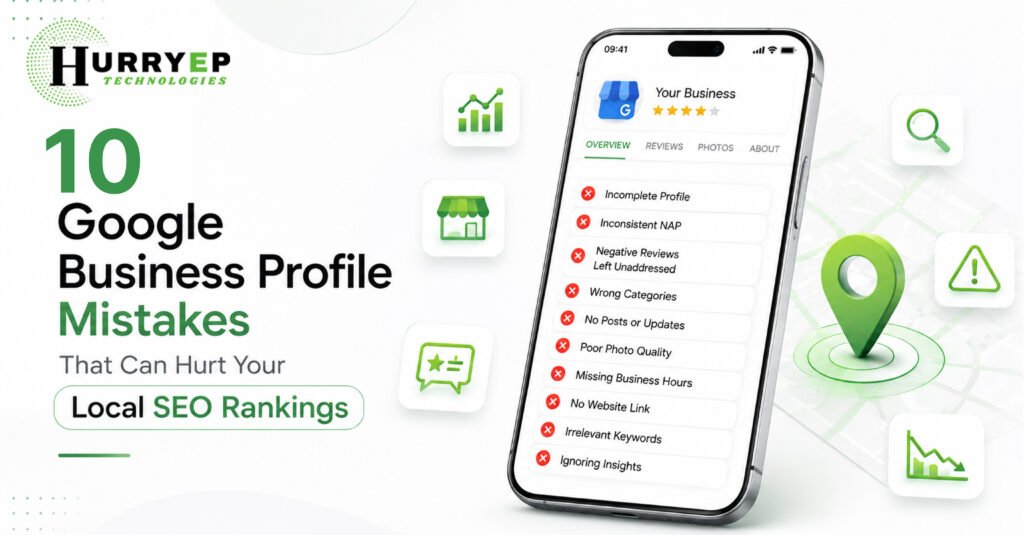
If your business isn’t showing up when nearby customers search for what you offer, the problem often isn’t your website — it’s your Google Business Profile. Small, avoidable Google Business Profile mistakes are one of the most common reasons local businesses lose visibility on Google Maps and in local search results. Even a single overlooked detail, like an outdated phone number or an unanswered review, can quietly push you down the rankings while competitors move up.
In this guide, we’ll break down the ten most damaging GBP mistakes business owners make, why they hurt your local SEO, and exactly how to fix them. Whether you’re managing your profile yourself or planning a full Best Google Business Profile optimization strategy, this guide will help you turn your listing into a genuine lead-generation asset.
Google Business Profile (formerly Google My Business) is the foundation of local search visibility. It’s the listing that appears in the Local Pack, Google Maps, and knowledge panels whenever someone searches for a business “near me” or within a specific city.
Search engines rely heavily on GBP signals — categories, reviews, photos, posts, and business information — to determine which businesses deserve top placement for local queries. A well-optimized profile directly influences your Google Maps ranking, while a neglected one can suppress your visibility even if your website SEO is otherwise strong.
Here’s why it matters so much:
Understanding this connection is the first step. Now let’s look at the mistakes that quietly sabotage it.
One of the most frequent Google Business Profile mistakes is leaving fields incomplete or letting your Name, Address, and Phone number (NAP) differ across platforms. Inconsistent NAP data confuses Google’s algorithm and erodes the trust signals it uses to rank listings.
The fix: Ensure your business name, address, phone number, website, and hours match exactly across your GBP, website, and other directories like Justdial, Yelp, or Facebook. Consistency across the web strengthens your authority for local business SEO.
Your primary and secondary categories tell Google exactly what your business does and which searches you should appear for. Selecting a broad or incorrect category — say, “Marketing Agency” instead of “Digital Marketing Consultant” — limits your visibility for relevant searches.
The fix: Choose the most specific primary category that matches your core service, then add relevant secondary categories. Revisit categories quarterly, especially if your services have expanded.
Reviews are a major ranking factor and a trust signal for potential customers. Businesses that ignore Google reviews — both positive and negative — miss opportunities to build credibility and demonstrate active management.
The fix:
A profile with outdated stock photos or no images at all feels untrustworthy to both users and Google’s algorithm. Visual content strongly influences engagement metrics, which feed into your Google Maps SEO performance.
The fix: Upload high-quality, recent photos of your storefront, team, products, and completed work regularly. Businesses with more photos consistently receive more direction requests and website clicks than those without.
Google Posts allow you to share updates, offers, and events directly on your profile, yet many businesses never use this feature. An inactive profile signals low engagement to Google’s ranking systems.
The fix: Publish posts weekly — highlighting promotions, new services, blog content, or seasonal updates. This keeps your Google Business Profile guide-worthy activity level high and gives potential customers fresh reasons to choose you.
The Questions & Answers section is public, and anyone can post or answer a question — including competitors or misinformed users. Leaving it unmonitored allows inaccurate information to sit unaddressed on your profile.
The fix: Proactively seed the Q&A section with common customer questions and accurate answers. Monitor it regularly and correct any misleading responses promptly.
Some businesses attempt to rank in multiple locations by listing virtual offices or addresses where they don’t genuinely operate. This violates Google’s guidelines and can lead to suspension of your entire profile.
The fix: Only list addresses where your business is physically staffed during posted hours. For service-area businesses without a public-facing office, use Google’s service-area business setting instead.
Incorrect business hours frustrate customers who arrive to a closed business, leading to poor experience signals and lost trust. During holidays, this mistake becomes especially costly.
The fix: Update special hours ahead of holidays, and audit your standard hours seasonally to ensure accuracy. This small habit protects both local SEO performance and customer satisfaction.
Many business owners fill out only the basic profile fields and skip the Attributes and Services sections, which help Google match your profile to more specific, high-intent searches like “wheelchair accessible” or “free consultation.”
The fix: Complete every applicable attribute and list each service individually with a short description. This improves your chances of ranking for long-tail, intent-driven local searches.
Without reviewing your profile’s performance data, it’s impossible to know what’s working. Many businesses set up their profile once and never revisit the analytics behind calls, clicks, and search queries.
The fix: Check GBP Insights monthly to understand how customers find you, which photos perform best, and which actions they take. Use this data to refine your Google Business Profile optimization strategy continuously.
Beyond fixing mistakes, a proactive optimization strategy helps you stay ahead of competitors. Consider these best practices:
These practices, applied consistently, compound over time to strengthen both your GBP optimization and your broader digital presence.
An actively managed profile delivers measurable business outcomes, not just ranking improvements:
Together, these benefits make GBP one of the highest-return local marketing investments a business can maintain.
Incomplete or inconsistent business information — particularly mismatched NAP details across platforms — is the most common mistake, and it directly undermines local ranking signals.
Ideally, review your profile monthly and update posts weekly. Hours, photos, and service listings should be checked whenever anything changes in your business operations.
Yes. Review count, rating, recency, and how you respond to reviews all factor into Google's local ranking algorithm, making review management essential for local search rankings.
Absolutely. An inaccurate or overly broad category prevents your profile from matching the specific searches your ideal customers are using, reducing your Google Maps ranking potential.
Most businesses notice measurable improvements in visibility and engagement within 4 to 8 weeks of consistent optimization, though competitive markets may take longer.
Yes, unless your business is genuinely staffed at that location during business hours. Violating this can lead to profile suspension, so service-area settings are the safer choice for remote or mobile businesses.
Your Google Business Profile is far more than an online business card — it’s a direct lever for your local visibility, credibility, and customer acquisition. The mistakes outlined above are common, but each one is entirely fixable with consistent attention and the right strategy.
By avoiding these pitfalls and following proven Google Business Profile optimization practices, you position your business to rank higher, earn more trust, and convert more local searchers into paying customers.